


Playground: Child Care App
4.9137.00 Reviews
App Specs
- Version
- 3.3.0
- Updated On
- License
- Free
- Downloads
- 100,000+
- Developer
- After School Development
- Categories
- Education
- Platform
- Android
Screenshots
 Analysis by AppCompare
For a family using a daycare that shares updates through Playground: Child Care App, the main appeal is having everyday care information and provider communication gathered on a phone. I find that useful less as a replacement for talking with staff and more as a way to check details between drop-off and pickup. The experience depends on how actively a child’s provider uses the app, so it works best when families and caregivers treat it as a shared routine rather than a one-way feed.
Where a connection matters most
Messages, day updates, photos, and payment activity all involve information moving between the family and the care provider. In practice, that makes a reliable connection important when you want to check a recent note or send a question while away from home. I would not assume an update has reached someone just because I have typed it; for anything urgent, I’d use the provider’s agreed direct contact method instead.
One useful habit is to check the app at predictable points, such as after drop-off or before leaving work, rather than reopening it every few minutes. That makes it easier to notice meaningful changes without letting notifications interrupt the day. If a photo or daily note is important to discuss at pickup, I’d treat the app as a prompt for that conversation, not as a substitute for it.
Designed for quick mobile checks
The strongest fit is a parent or guardian who needs to handle small childcare tasks while moving through a busy day. A quick look at a meal or nap update can answer a practical question without a call, while the messaging area gives families a place to contact staff about routine matters. I can see it helping when two adults share pickup duties: both can refer to the same care information instead of relying on one person to relay every detail.
There is a trade-off, though. A phone makes information convenient, but it can also pull attention away at the wrong moment. I’d save non-urgent messages for a safe pause, and I wouldn’t read or type while driving or supervising a child. Families who prefer a paper handover or a brief face-to-face conversation may find those methods more dependable for sensitive or complicated topics.
What to do when something stalls
If a message, image, or update seems slow to appear, I’d first check whether the phone has a working connection, then reopen the app and give it a moment before sending the same item again. Repeatedly submitting a payment or message can create confusion, so it is better to confirm what happened with the provider if the result is unclear. For a time-sensitive concern, a direct call is still the sensible fallback.
The app’s usefulness also depends on the childcare center’s own workflow. A quiet feed does not necessarily mean that nothing happened; staff may be busy, or a particular update may not have been shared yet. I’d agree with the provider about which updates they normally post and when families should expect a reply. That small conversation sets realistic expectations and prevents the app from becoming a source of unnecessary worry.
Worth Reading Before You Choose

EA SPORTS FC Mobile 26 Is a Bigger Football Game, but It Takes Time

Flipboard Shows What News Apps Must Do Beyond the Feed

Switching to Android Auto Means Rethinking Your Driving Routine

Google Calendar Makes a Crowded Week Easier to Manage

Ludo King Makes the Most of the Minutes Between Plans

Baby Panda World Brings Quick Play to Modern Phones, but Its Game Library Feels Busy
Keep mobile use thoughtful
Because family and childcare information can be personal, I’d use a screen lock and avoid opening the app where other people can easily see a child’s details or photos. I’d also keep the app focused on care-related communication instead of using it as a catch-all for every family reminder. A separate calendar or shared household list may still be better for appointments, shopping, and tasks that the provider does not need to see.
For families watching mobile data use, it is sensible to avoid repeatedly loading shared media when a connection is limited and to check the phone’s own data settings if usage is a concern. I would not plan around being able to access everything without a connection. Before a long trip or a day with unreliable service, I’d make sure I know how to reach the provider by another agreed route.
How it fits into a childcare routine
Hey there, fellow parents and guardians! If you’re juggling busy schedules and trying to stay on top of your child’s daycare needs, you’re going to want to hear about Playground: Child Care App. I’ve been diving into this app to see if it truly delivers on its promises, and I’m here to share all the juicy details with you.
What’s the Buzz About?
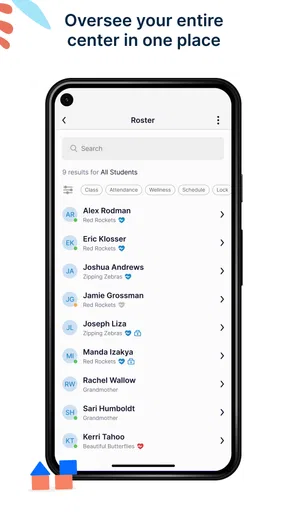
So, what exactly is Playground all about? In a nutshell, this app is designed to make managing child care a breeze for parents and caregivers. It’s like having a personal assistant dedicated to keeping track of everything from daily schedules to billing and communication with your child’s care providers. Pretty neat, right?
Getting Started
First things first, getting set up on Playground is super straightforward. You download the app on your Android or iOS device, sign up, and you’re pretty much ready to roll. The interface is clean and intuitive, which is a big plus in my book. Nobody’s got time to fiddle with complicated setups, especially when you’re trying to wrangle kiddos.
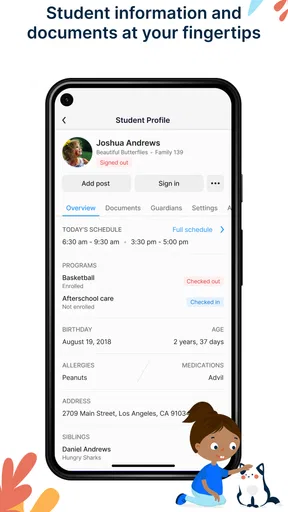
Once you’re logged in, you can add your child’s details, link up with their daycare or child care provider, and start exploring the features. The app is designed to keep everything you need right at your fingertips.
Features That Stand Out
Here’s where Playground really shines. There are several features that caught my eye:
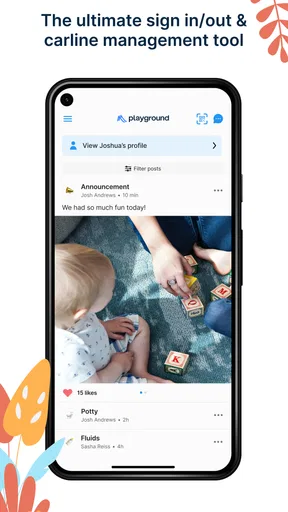
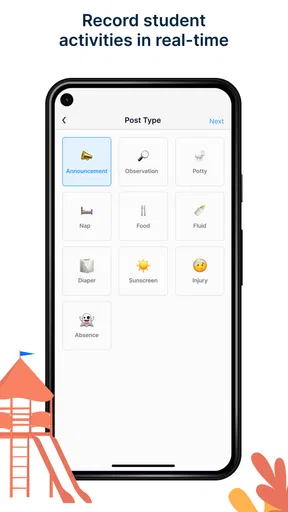
- Real-time updates: You can get live updates on your child’s day, including nap times, meal logs, and activities. It’s like getting a sneak peek into their day without being there.
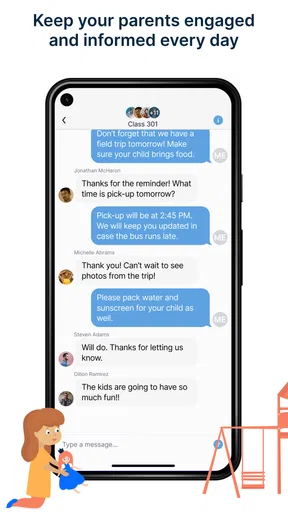
- Messaging system: Forget the back-and-forth emails and phone calls. You can message directly with the daycare staff through the app, making communication quick and efficient.
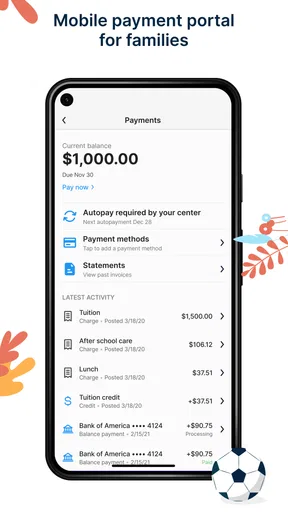
- Billing management: No more scrambling to find that misplaced invoice. Playground neatly organizes all billing information and even allows you to pay right through the app.
- Photo sharing: Who doesn’t love seeing adorable snaps of their kid having fun? Caregivers can share photos and videos, giving you peace of mind and a smile during your busy day.
What I Loved
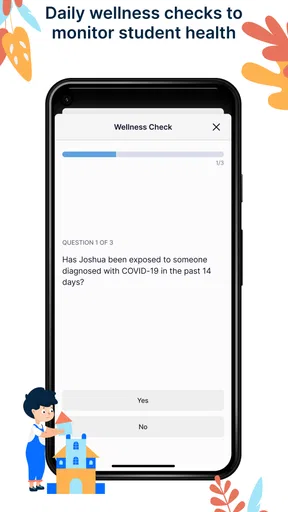
One of my favorite aspects of Playground is how much it simplifies life. As a busy parent, anything that streamlines my day is a winner. The app actually helps reduce the mental load by keeping all the important info in one place. I also appreciate the security measures they have in place, ensuring that all data is kept safe and private. It’s an app that clearly understands the needs of modern families.
Room for Improvement
While Playground is pretty impressive, there are a couple of areas where it could improve. For one, expanding the app’s language options would be a fantastic addition, making it more accessible for non-English speaking families. Additionally, a few users have mentioned that they’d like to see even more integration options with other calendar apps.
The Final Verdict
So, is Playground worth downloading? In my opinion, absolutely! It’s a fantastic tool for parents and caregivers who want to stay connected and organized. The convenience and peace of mind it offers are invaluable, especially in today’s fast-paced world. Whether you’re a seasoned parent or a newbie in the child care scene, Playground’s got your back.
If you’re ready to give it a go, you can find the app on both Android and iOS. Trust me, once you start using it, you’ll wonder how you ever managed without it. Happy parenting!
Who benefits most—and who may prefer another approach
I’d recommend this childcare app most to families whose provider already shares daily records, messages, billing details, and media through it. Its advantage over a paper note or scattered email thread is that those different kinds of information have a common place to check. That can be especially helpful when one parent handles morning drop-off and another handles pickup, or when a grandparent occasionally needs to follow the same routine.
It is less compelling if a center rarely posts updates or prefers all communication in person. An app cannot make a provider more responsive, and it cannot replace a proper conversation about a child’s health, behavior, or a change in care. If your main need is a general family calendar, a dedicated calendar app is likely a better fit; if you only need occasional announcements, the center’s existing email or phone process may be simpler.
A realistic day-to-day workflow
Imagine a workday when a parent has to leave a meeting, arrange pickup with a partner, and remember whether a routine payment has been handled. A practical approach is to check the child’s daily update during a natural break, send one concise message if clarification is needed, then review billing separately when there is time to act carefully. The partner can refer to the shared care information before pickup rather than relying on a rushed call between adults.
That workflow works best when messages are specific. Instead of sending several short notes, I’d put the relevant question and context together, making it easier for staff to respond between their childcare responsibilities. I’d also avoid treating read or visible information as proof that a request has been understood; for an important change, I would confirm it directly with the provider.
Small habits that prevent confusion
One non-obvious benefit of keeping care updates in one place is that they can help a family notice patterns over time, such as recurring questions about meals or naps, without trying to reconstruct the week from memory. I’d use that as a conversation starter with caregivers, not as a way to draw conclusions from a single entry. A daily log is useful context, but the staff member who was with the child can explain what a brief entry leaves out.
It also helps to decide within the family who will monitor routine updates and who will handle billing, rather than assuming everyone will notice everything. Shared access can reduce handoffs, but it can also lead to duplicated messages or uncertainty about who has replied. A simple household agreement—one person takes the lead on a particular task, while the other knows where to check—keeps the app from adding another layer of coordination.
What to expect from the provider relationship
Playground is made by After School Development and is an education app aimed at organizing communication around child care. The app is free, rated for Everyone, and has a 4.9 average from around 1,100 ratings, with over 50,000 installs. It was released on December 7, 2019, and version 3.2.0 supports devices running Android 8.0 or later. Those figures suggest an established audience, but the day-to-day value still depends more on whether your child’s center uses it consistently than on popularity alone.
Before relying on it, I’d ask the provider which items they normally post, how quickly families should expect replies, and what channel to use for urgent matters. That is more useful than assuming every center uses the same routine. It also answers a practical question families often have: the app can organize the exchange, but the provider sets the communication habits that make it genuinely useful.
My connectivity verdict
For me, the best way to think about Playground is as a convenient bridge between home and a participating childcare provider, not as a guaranteed live window into every moment of a child’s day. Its mobile format makes quick checks and routine messages easy, while connection interruptions and provider response times are real constraints to plan around. I’d keep a direct contact option handy, use the app for ordinary updates and records, and reserve sensitive or urgent matters for a conversation that gets a clear response.
If your daycare already relies on this shared system and you want care updates, photos, conversations, and billing gathered together, it is worth trying. If you need a universal organizer, expect instant replies, or prefer not to handle family information on a phone, another method may suit you better. Used with sensible expectations, it can make the small logistics of childcare easier to manage without pretending that an app can replace the people providing the care.
Pros
- Intuitive interface for easy navigation.
- Engaging educational activities for kids.
- Customizable notifications for parents.
- Secure login and data protection features.
- Offline mode available for uninterrupted use.
Cons
- Limited language options available.
- Requires frequent updates for new content.
- Some features locked behind a paywall.
- High battery consumption during use.
- Occasional app crashes reported by users.
FAQs for Playground: Child Care App
What age group is Playground: Child Care App suitable for?
Playground: Child Care App is designed for children aged 2 to 12 years old. It offers a range of activities and educational content tailored to different developmental stages, ensuring that the app is engaging and beneficial for various age groups. Parents can select age-appropriate content to match their child’s needs.
Is the Playground app safe for my child to use?
Yes, the Playground app prioritizes child safety. It includes robust parental controls that allow caregivers to monitor and manage content access. The app is free from third-party ads, ensuring a secure and distraction-free experience for children. Additionally, all content is vetted for age-appropriateness and educational value.
Does the app require an internet connection?
Playground: Child Care App offers both online and offline functionality. While some features and updates require an internet connection, many educational games and activities can be accessed offline. This makes it convenient for use during travel or in areas with limited internet connectivity.
Are there any in-app purchases or subscriptions required?
The app offers a freemium model where basic content is available for free. However, there are optional in-app purchases and subscription plans that unlock additional features, content, and educational modules. Parents can choose these options to enhance their child's learning experience without encountering unexpected charges.
How can parents track their child's progress in the app?
Playground: Child Care App includes a detailed progress tracker for parents. This feature allows caregivers to monitor their child's achievements, time spent on activities, and skill development. The app provides comprehensive reports and insights, helping parents understand their child's learning journey and areas needing attention.


